
Headless Magento 2 Explained: What Decoupling the Frontend Actually Does
 By Sobhan Yaghoubi
If you have spent any time researching Magento 2 performance improvements, you have almost certainly run into the word headless. It tends to appear alongside phrases like React, Next.js, and GraphQL, and it is usually followed by impressive-sounding Lighthouse scores. What the articles often skip is the straightforward explanation of what headless actually means and more importantly, what it does to your store.
This guide is that explanation. No jargon dumps. If you run a Magento 2 store and you are wondering whether headless is relevant to you, start here.
The Classic Magento 2 Setup: One System Doing Everything
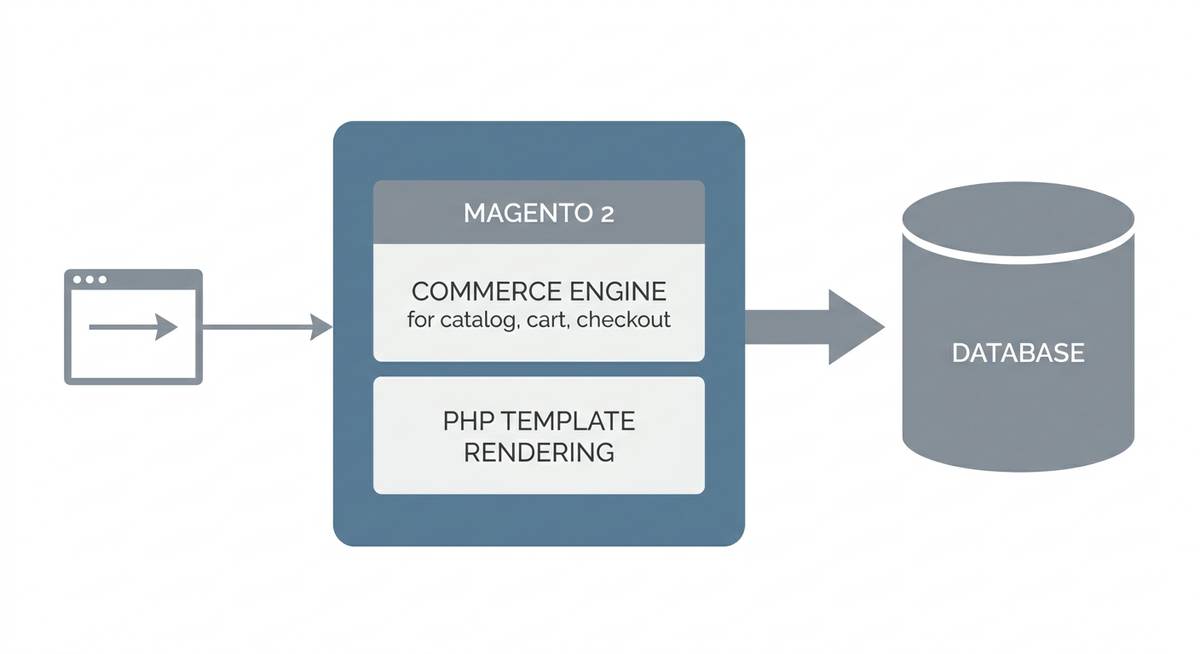
In a standard Magento 2 store whether it runs on Luma or Hyva, Magento handles two distinct jobs at the same time. First, it manages your commerce data: the product catalog, pricing rules, promotions, the cart, and the checkout. Second, it generates the HTML pages that shoppers actually see, pulling that data together and rendering it server-side on every request.
Think of it like a restaurant where the chef cooks the food and also walks it out to every table personally. The kitchen is excellent. The problem is that as more tables fill up, the chef gets slower, and the food arrives cold.
That second job, generating the HTML, is where Magento's performance ceiling tends to sit. Each page request triggers PHP, database queries, and template rendering. The result lands in the browser as a large HTML document packed with CSS and JavaScript that the browser must then parse and execute before the shopper sees anything useful. On a mobile device on a middling connection, that process takes time your shoppers will not wait for.
What Decoupling Actually Means
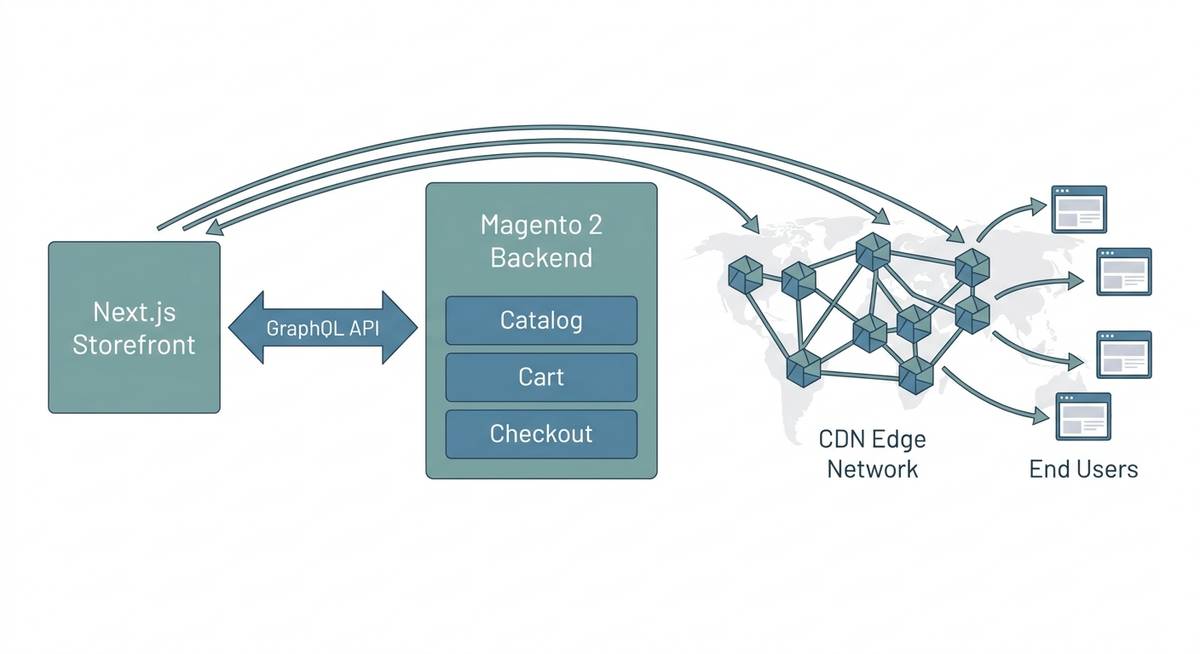
Headless architecture splits those two jobs apart. Magento keeps the first job entirely: catalog, cart, checkout, pricing, promotions, order management. Nothing changes in the commerce engine. What changes is who renders the pages.
Instead of Magento generating HTML, a separate frontend application typically built with React or Next.js takes that responsibility. The frontend talks to Magento through its GraphQL API, requesting only the specific data it needs for a given page: product title, price, images, stock status. Magento returns structured data. The frontend turns that data into a web page.
Back to the restaurant analogy: now the kitchen focuses entirely on cooking. A dedicated front-of-house team handles everything the diner experiences. Both sides do their jobs faster because they are not doing each other's job.
Why GraphQL Matters Here
Magento 2 exposes a GraphQL API specifically designed for this pattern. GraphQL lets the frontend ask for exactly the fields it needs in a single request, no more, no less. Compare that to a traditional REST API call that returns an entire product object when you only need the name and price. Fewer bytes over the wire means faster responses, which matters most on mobile networks where your highest-traffic shoppers are.
The Magento backend still owns all commerce logic. Promotions, tax calculations, inventory, checkout: these all continue to run through Magento. The frontend simply surfaces them through a purpose-built interface rather than through Magento's own rendering layer.
How the Frontend Delivers Pages Faster
A well-built headless storefront takes advantage of two techniques that Magento's native rendering cannot easily replicate.
Pre-rendering: With Next.js, product listing pages, category pages, and even many product detail pages can be generated at build time or at the edge, so when a shopper requests a page, a pre-built HTML file is served immediately with no PHP, no database query, no template rendering in the critical path. The browser receives a complete HTML document in milliseconds.
Edge delivery: Pre-rendered pages can be cached and served from a Content Delivery Network node close to the shopper's location. A shopper in Toronto hits a cached page from a nearby edge node rather than a server in a distant data center. Latency drops significantly.
The combination of minimal JavaScript shipped to the browser, pre-rendered pages, and edge caching is what moves Lighthouse scores into the 90s and cuts load times from the high single digits down toward one second.
What Changes and What Does Not
This is the part that surprises most store owners: your commerce operations do not change at all.
- Your catalog, pricing, and promotions are still managed in the Magento Admin.
- Your checkout, payment integrations, and order management stay intact.
- Your existing ERP, PIM, or OMS integrations connect to Magento exactly as they do today.
- Your team's day-to-day workflows in the Magento backend are unchanged.
What changes is the layer that shoppers interact with. The storefront, every page template, every component, every interaction, is rebuilt as a React or Next.js application. That gives developers full control over performance, UX, and the JavaScript budget. It is also what allows a Lighthouse CI gate to enforce a 90 percent or higher score on every code change before it goes live.
A Real-World Example: Royal Creation
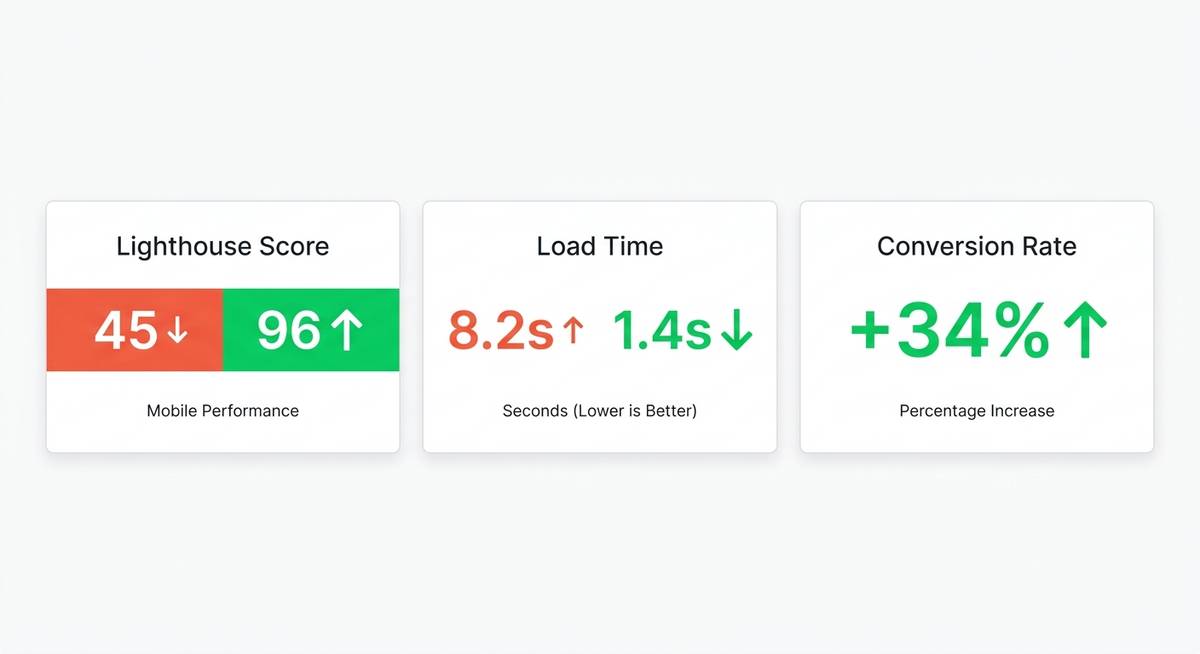
Royal Creation, a Swiss maker of handcrafted rugs, was running a Magento 2 store on a Luma theme. Lighthouse score: 45 percent. Load time: 8.2 seconds. The catalog and commerce logic were sound. It was the rendering layer that was the bottleneck.
The solution was a headless rebuild with Next.js on top of the existing Magento 2 backend. The commerce engine stayed in place. The frontend was replaced. The outcome: Lighthouse score climbed to 96 percent, load time dropped to 1.4 seconds, and conversion rate increased by 34 percent.
The 34 percent conversion lift is the number that matters most to a business decision. Faster pages convert better, not as an abstract principle, but as a measurable outcome. Shoppers who previously left before the hero image loaded now completed their sessions.
Is Headless Right for Your Store?
Headless is not the right answer for every Magento 2 store. If your current Lighthouse score is already in the 80s and your conversion rates are healthy, the investment may not be justified. A Hyva theme migration or targeted performance optimization may close the gap at lower cost and complexity.
Headless makes the most sense when you are hitting a hard performance ceiling with Luma or a custom PHP theme, when mobile conversion is meaningfully below desktop, when you need a level of frontend customization that Magento's templating system cannot deliver, or when you are planning for Black Friday and Cyber Monday traffic volumes that require edge-scale delivery.
The right starting point is a Lighthouse audit against your current store. That baseline tells you exactly where the performance budget is being spent and what approach, whether optimization, Hyva, or a full headless rebuild, will move the numbers you care about.
If you want that audit, contact the Vesta-Web team. We have run Magento 2 headless builds since 2018, with 20 or more Adobe Commerce-certified developers, and we guarantee a 90 percent or higher Lighthouse score on every headless project we deliver. The initial audit is free, with no commitment required.

Ready to Transform Your Store?
Get a free performance audit from our certified Magento 2 team.
Get a Free QuoteMore Articles

Sat Jul 11 2026 · 14
What Does Headless Magento 2 Cost? A Realistic Breakdown

Mon Jun 29 2026 · 11
Magento 2 Lighthouse Score: 45 to 96 (A Real Case Study)

Sat Jun 27 2026 · 7
The Pre-BFCM Performance Checklist for Magento 2 Stores

Thu May 28 2026 · 8